Inspecting the RF signal of Somfy blinds
In this article I describe how I used a HackRF for inspecting the RF signal sent by the remote of my Somfy branded electric blinds. I will also show you how to synthesize and replay the signal using GNU Radio.
Finding the frequency
The first step is to find out the frequency of the signal sent by the remote. Sometimes the frequency will be shown in the back of the remote, but in my case it wasn't.
I used a tool called gqrx which has a spectrum analyzer showing the strength of all RF signals within a range of frequencies.
You select a center frequency, and it will show you all signals within a range of that frequency. The width of the range is equivalent to the sample rate of your device, which can be up to 20MHz for HackRF.
I had a guess that the frequency of this device would be around 433 MHz, so I directly tuend it to that center frequency. At that point I pressed the buttons on the remote several times to see if the signal would show up. This is what the spectrum analyzer showed:
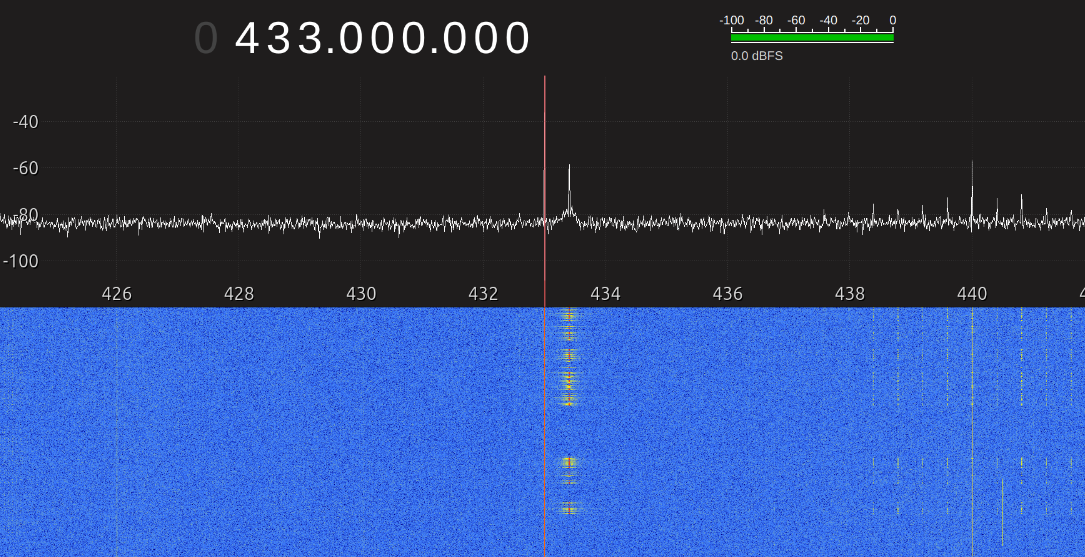
This tells me the frequency is somewhere between 433 MHz and 434 MHz. This is good enough for now, and we'll get a more precise reading with GNU Radio.
If your remote doesn't work at 433 MHz, then you may try other common frequencies such as: 300 MHz, 315 MHz, 868 MHz, 915 MHz or 2.4 GHz.
Recording the signal with GNU Radio
Now that we know the approximate frequency of the signal, we can use it to record the signal and save it to a file, so we can later inspect it in detail.
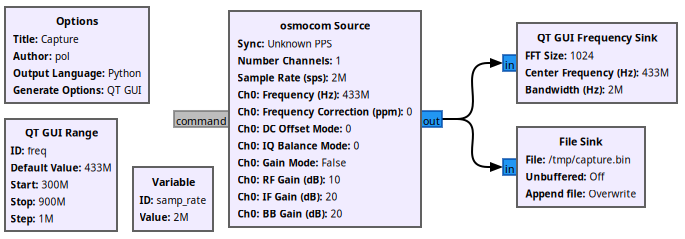
For this step, I used a very simple GNU Radio flow which dumps the signal into a file (/tmp/capture.bin).
This is the flow:
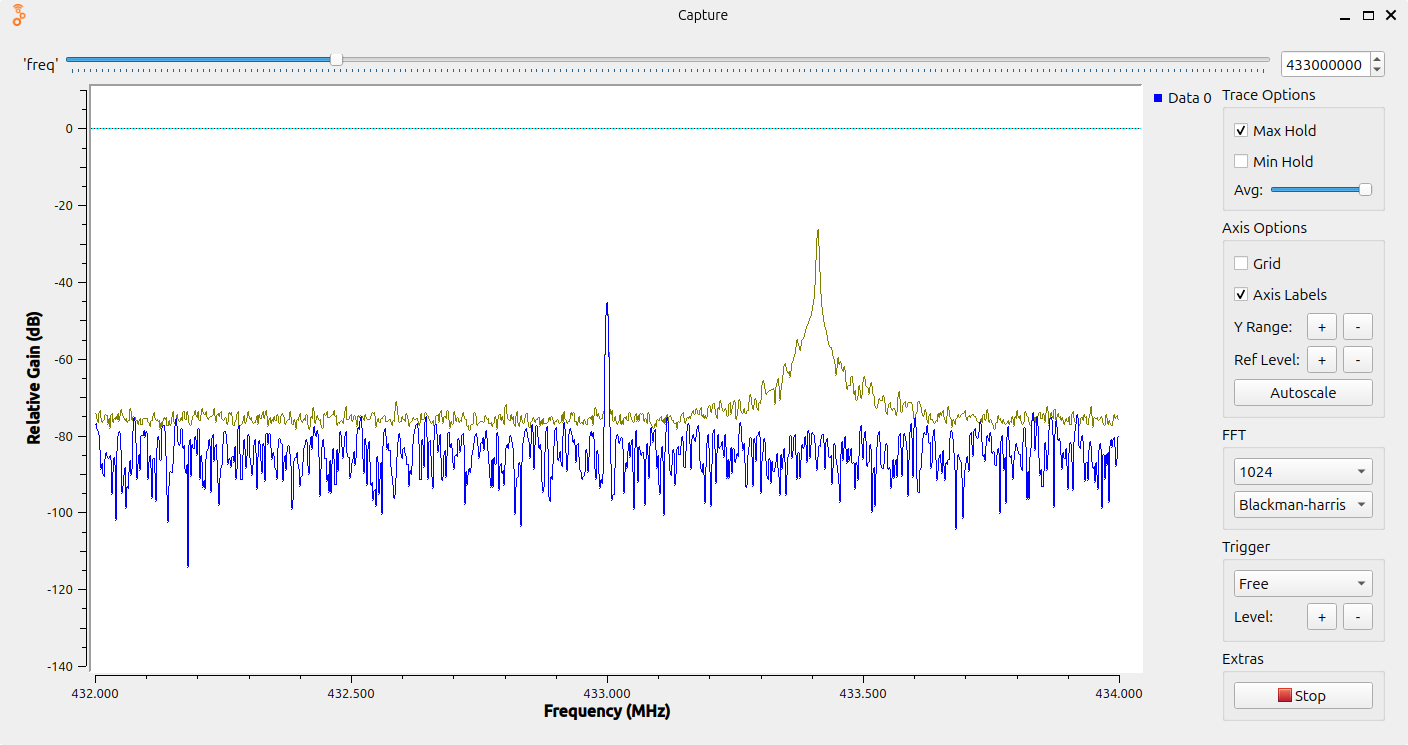
The program in action:
You may find the project file here: capture.gru
While the flow is running, it will record all samples to a file, and display a frequency chart. By enabling "Max Hold" and hovering the mouse over the recorded peak, I can now see the exact frequency is 433.410 MHz.
⚠️ Be careful: the capture file grows fast at 16 MB/s. If you leave the program running for too long it will use up the empty space on your hard drive. If you just want to look at the frequencies, I recomment you disable the "File Sink" node (right click, then "Disable"). The 16 MB/s comes from: 2M samples/second * 8 bytes per sample.
Inspecting the signal with Inspectrum
After the signal has been captured and saved in a file, it is time to look at it using Inspectrum:
inspectrum /tmp/capture.bin
This is what the signal looks like:
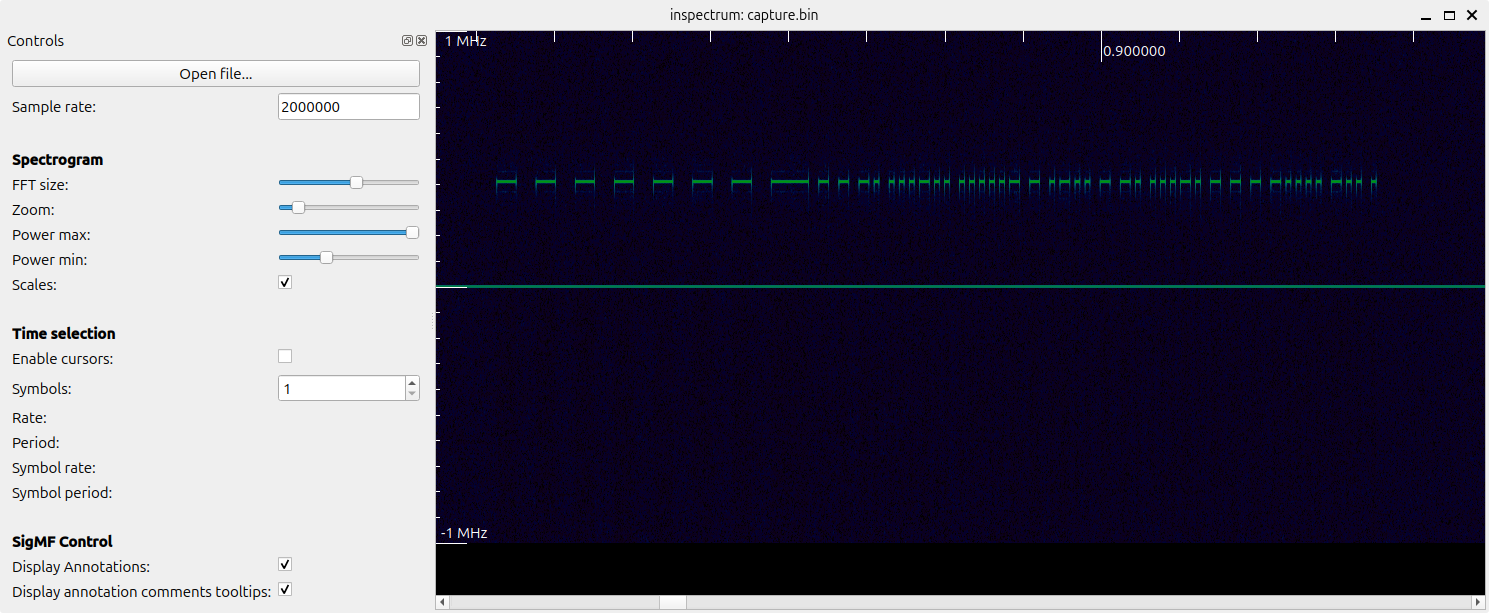
It is similar to the spectrum analyzer of gqrx with the axes swapped: the vertical axis shows the frequency, while the horizontal axis shows time.
As you can see, there is an on-off pulse pattern, and if you could scroll horizontally, you'd see the same pattern repeating with a short pause in-between cycles.
Inspectrum has a cool feature called "cursors" useful for measuring the length of the pulses:
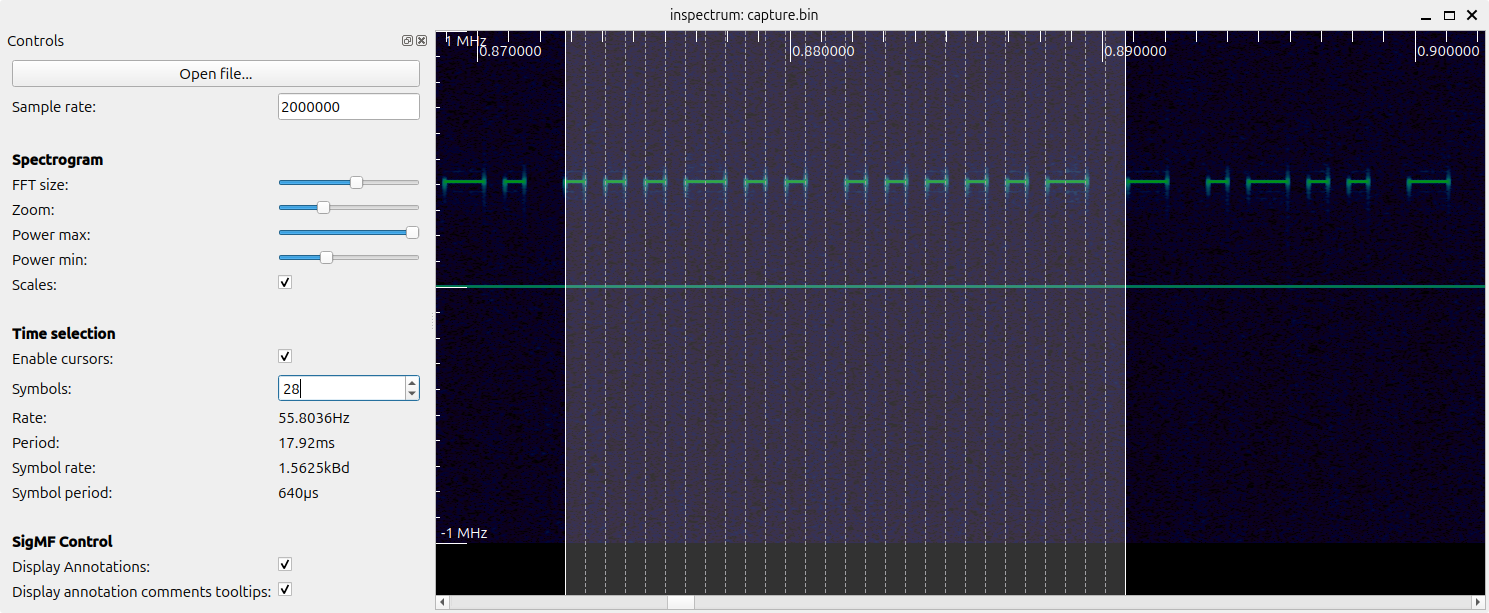
In summary, we are looking at a signal with the following properties:
- Frequency: 433.41 MHz
- Encoding: on-off keying (OOK)
- Pulse duration: 640 μs (microseconds)
- Total cycle duration: 112.64 ms
- Gap between cycles: 26.88 ms
- Fixed code: the exact same code is sent repeatedly every time
Synthesizing the signal with GNU Radio
The following GNU Radio project replays a synthetic version of the original signal emitted by the remote:
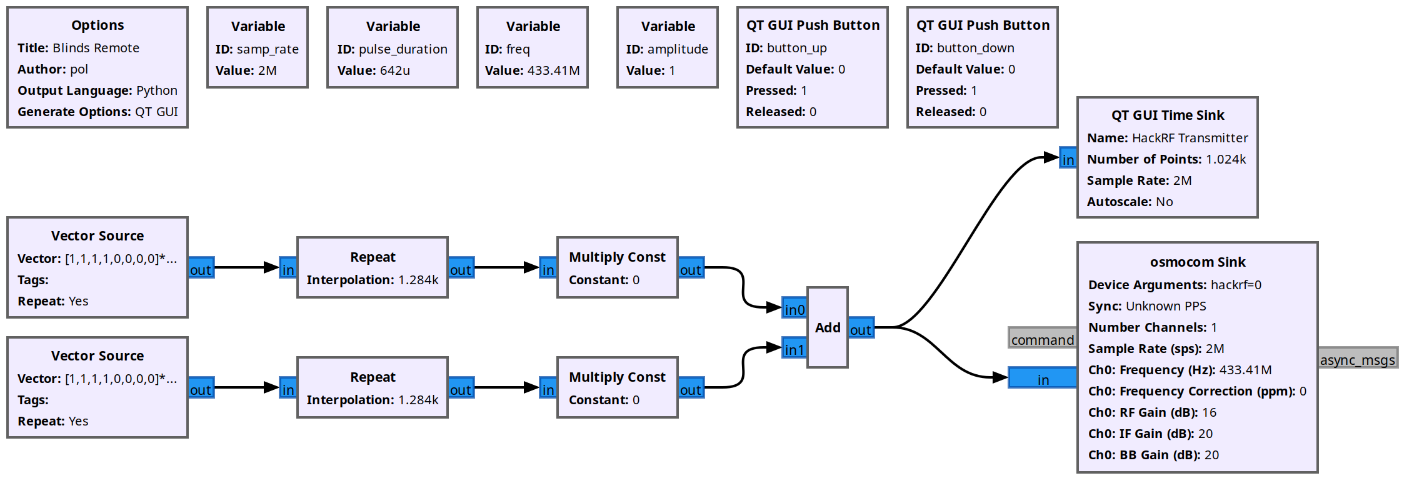
These are the relevant blocks in the main flow:
- Vector Source: produces the same sequence of 0s and 1s in a loop. There are 2 of them, one producing the "blinds up" sequence, and the other one producing "blinds down". The specific sequence of bits is the same I obtained from the recorded signal using Inspectrum.
- Repeat: repeats each value in the sequence to match the number of samples expected during one pulse (640 μs * 2 M/s = 1284 samples).
- Multiply Const: multiplies by 1 if the button is pressed, 0 otherwise. When no buttons are pressed, we'll be sending a zero signal to HackRF, so there won't be a transmission.
- Add: the 2 flows (up and down) are mixed together. Only one button will be pressed at a time, which means only one signal will be non-zero, and this block will output that signal.
- osmocom Sink: this block sends the signal to the HackRF for trasmission.
Here is the project file: blinds-remote.grc
Replaying the signal with the Portapack H4M
The HackRF device I'm using is the Portapack H4M with the Mayhem firmware version. This little thing comes with the Replay app, which can transmit a signal previously saved in the SD Card. While you can record the signal with the Capture app, using the synthetic version will result in a much cleaner signal being transmitted.
The Replay app expects 2 files, one with extension .C8 (e.g. blinds-up.C8), and another one with the same name but extension .TXT (e.g. blinds-up.TXT):
- blinds-up.C8: a binary file containing a sequence of samples, each sample being 2 signed bytes, representing the I and Q values. Since the signal is OOK, we can simply write values (127, 0) for the samples where the HackRF should transmit, and (0, 0) for samples where it should not.
- blinds-up.TXT: text file describing the sample rate and center frequency, and it looks like this:
sample_rate=500000
center_frequency=433410000
This is the Python script I used to generate all the files: blinds-replay.py
💡 Pro tip: when generating the file with a fixed code, make sure to generate a few repetitions of it with the expected silent gap between them. Some devices expect to see the code multiple times before acting. I also noticed the Portapack H4M with the Mayhem is buggy when replaying very short files, especially when done in loop mode.
Details of the remote analyzed
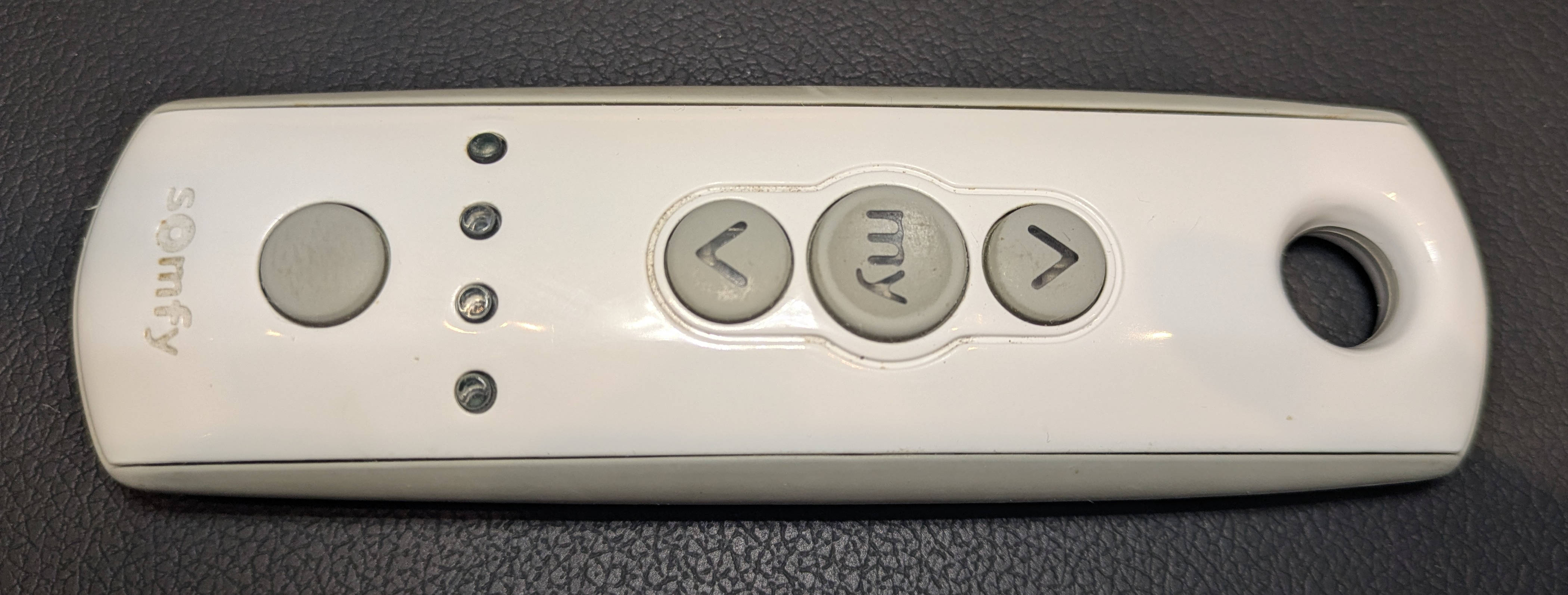
Pictures of the remote:
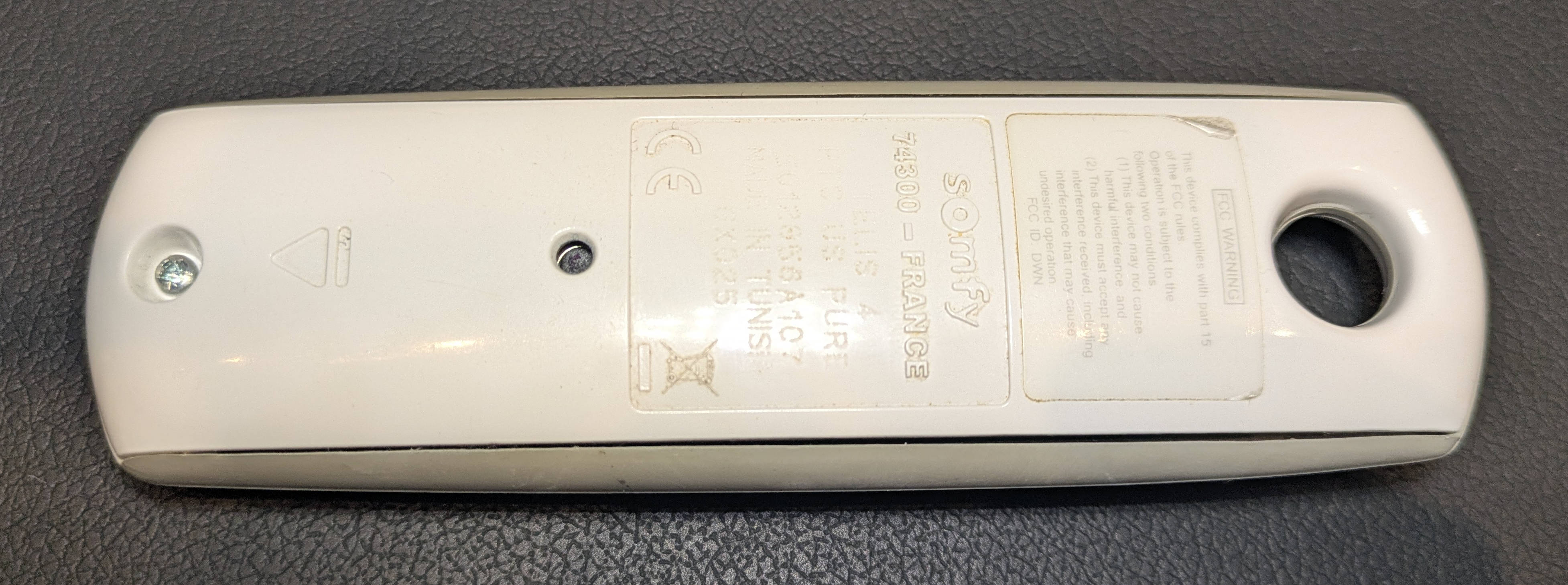
Text in the back:
Somfy
74300 - France
TELIS 4
RTS US PURE
5012856A107
MADE IN TUNISIA
GX025
Future project: activate Somfy blinds with Alexa
The Somfy blinds I own are old and don't come with an integration with Alexa. For a future project I plan to attach a 433 MHz transmitter to a Raspberry Pi and use an Alexa command to trigger the transmission so I can control the blinds by voice. Stay tuned!
Update: check out how to connect Somfy blinds to Alexa using a Raspberry Pi.
Useful links
This was my first time playing with software-defined radio. This is a list of resources I found helpful:
- Software Defined Radio with HackRF by Great Scott Gadgets: a 10-hour series of Youtube videos going in detail about the basics of RF, GNU Radio and the HackRF itself. Michael Ossmann is great at teaching complex topics in a simple way.
- OpenSourceSDRLab: the online store where I bought my HackRF One Portapack H4M. In particular, I bought the "Clifford Heath Type C R10+ Version" which supposedly added strong protection to the antenna port.
- Mayhem Firmware: this the firmware I'm using on my Portapack. I found the documentation to be particularly useful.